Skip to the invite form

Chores for screen time · Invite-only beta

Chores done. Screens earned. Nobody nagged.

Post chores once. Your kids do them, snap a photo and earn screen-time minutes. When they want to play, your phone asks. You switch the screen on and tap Unlocked.

Free during the invite-only betaRuns in your browser, no app storeWorks alongside your devices’ own parental controls

Free beta · No app store · Nothing to install on the TV

  • 5questions build your starter board
  • 4-digitPIN. Kids need no email or phone number
  • 10%of each job’s minutes saves itself (rounded down)
A parent’s phone showing “All clear — nothing needs you right now” next to a kid’s tablet showing her quest board.

You’ve asked three times.

The dishwasher is still full.

The tablet is already on.

Five steps. You do two.

01YOU

Post it once.

Pick from a library of ready-made jobs, or type your own and the Coach (a computer helper) writes a checklist a kid can follow. Set the minutes, who does it (one kid, first come, or taking turns) and the days it repeats.

02KID

She does it. A photo proves it.

Maya snaps a photo of the finished job. An AI photo checker compares it with the checklist and gives borderline work the benefit of the doubt: a pass pays on the spot. Can’t tell from the photo? One retake, then it comes to you.

03THE APP

Minutes land. Some get saved.

Minutes go to her wallet, and about 10% (rounded down, up to the bank’s cap) goes to her bank on its own, unless you change it.

04KID

She picks a screen.

Only the screens you set up, only inside your screen-time hours, only up to each screen’s limit. The minutes come off the moment she asks.

05YOU

You tap Unlocked.

Your phone buzzes: Maya wants 30 minutes on the TV. Switch it on and tap Unlocked. Her 30 minutes count from when she asked, so a quick yes gives her the full half hour. Miss it? The app pings you again, and tells you when her time is up.

That’s the loop. Tomorrow it runs again.

Repeating jobs go back up every morning on their own.

Request an invite

See it for real

Watch a real setup.

The real app on a phone and a tablet, with a made-up demo family.

Demo family: Sam (parent), Maya, 9, and Leo, 7. Kids, PINs and screens were set up before recording, as they are for every beta family. Maya’s three jobs were done and approved off camera (the photo check isn’t shown). Everything else is real time, cut for length, never sped up.

Read what happens

The split

Your part is small. On purpose.

You set it up once. After that, the app does the daily work and hands you only what needs a parent.

You

Once, then a tap

Once3 things

  • Answer five quick questions. The board builds itself.
  • Set up each kid’s phone or tablet with a code.
  • Set your screen hours, limits and rewards.

Most days2 things

  • Switch the screen on and tap Unlocked.
  • Look at the odd photo the app wasn’t sure about.

The app

Every day, on its own
  • Puts the day’s jobs on the board every morning.
  • Lets the kids know what’s new.
  • Checks each proof photo against the checklist.
  • Pays out minutes and saves a slice.
  • Keeps the clock on every screen session and tells you when time’s up.
  • Pings you again if an unlock sits unanswered.
  • Sends a one-screen wrap-up Sunday evening.
The screen we built this for:
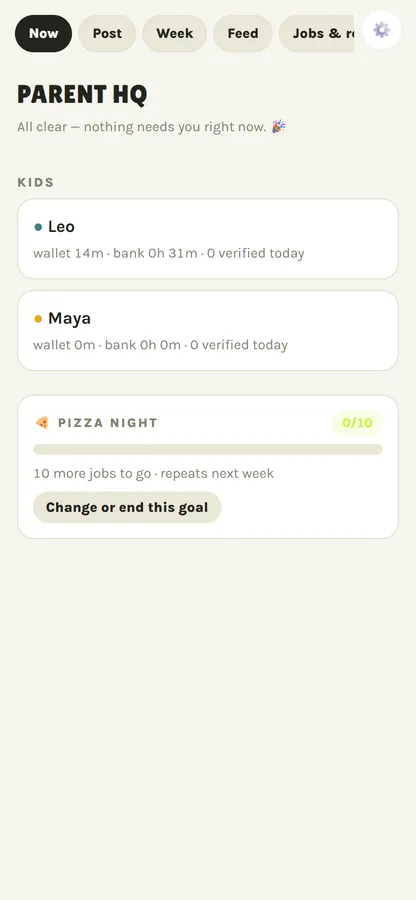
Parent HQ on a phone: All clear — nothing needs you right now.

During the beta, we set up your kids and screens with you.

You’re in charge

Your house. Your rules.

Every number is yours to set. Some below are examples: out of the box there are no per-screen limits, and auto-approve is off.

  • Screen-time hours

    7:00 AM – 9:00 PM

    No session starts outside your window in the app.

  • Limits per screen

    Xbox · 90 min weekdays

    Each screen gets its own daily cap, weekends too.

  • Auto-approve

    Tablet · 30 min, 3⁠–⁠7 PM

    Trust a screen more? Let it say yes without your tap.

  • Auto-save

    10% to the bank

    A slice of every job’s payout gets saved (rounded down), up to the bank’s cap. You pick the slice.

  • Rewards and goals

    Ice cream run · 90 min

    Trade minutes for real things, or chase a family goal together.

  • Fair play

    Warning, then −30 min

    Faked or reused photos cost minutes. You can refund a penalty.

Win / win

They don’t need a lecture. They need a scoreboard.

  • Their board, their look

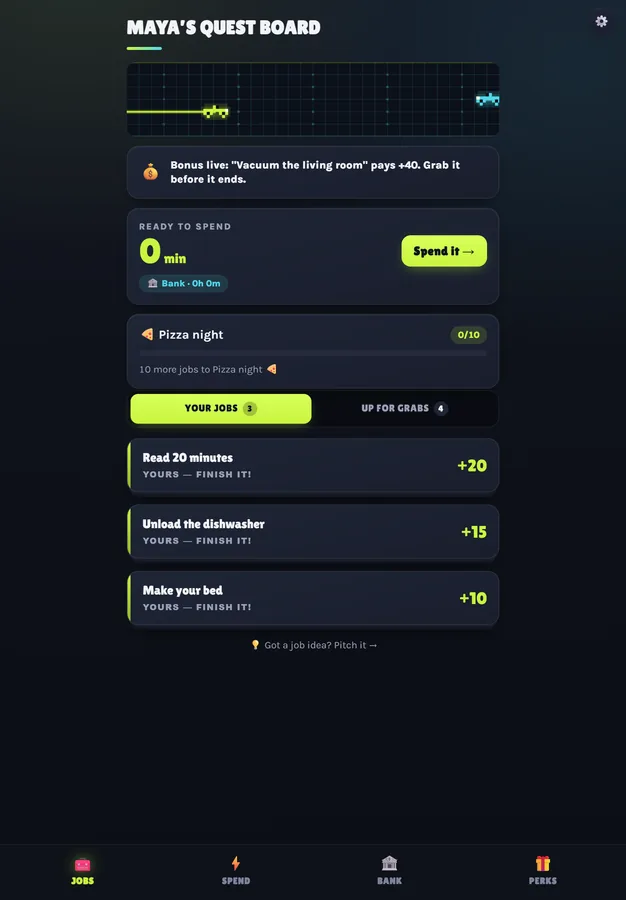
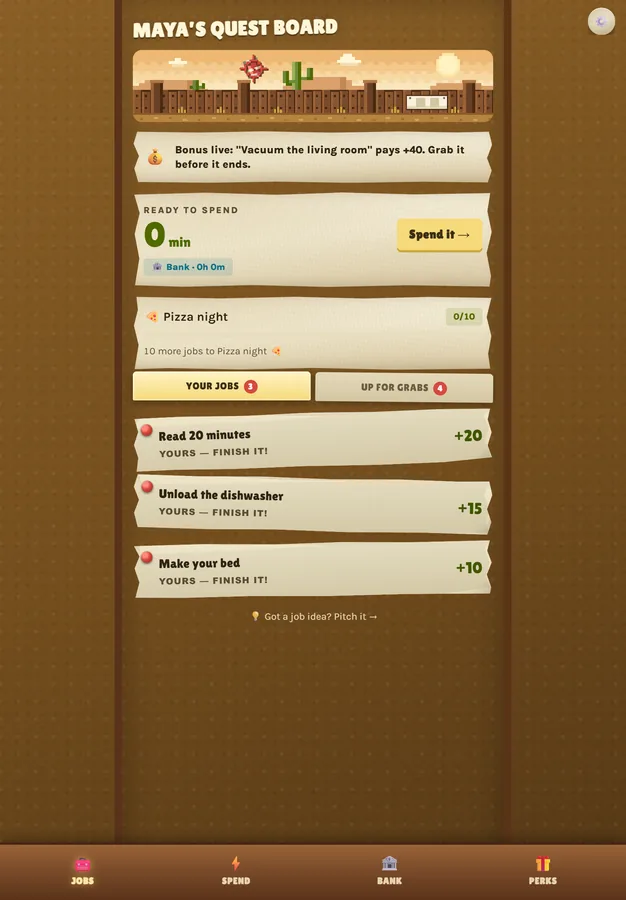
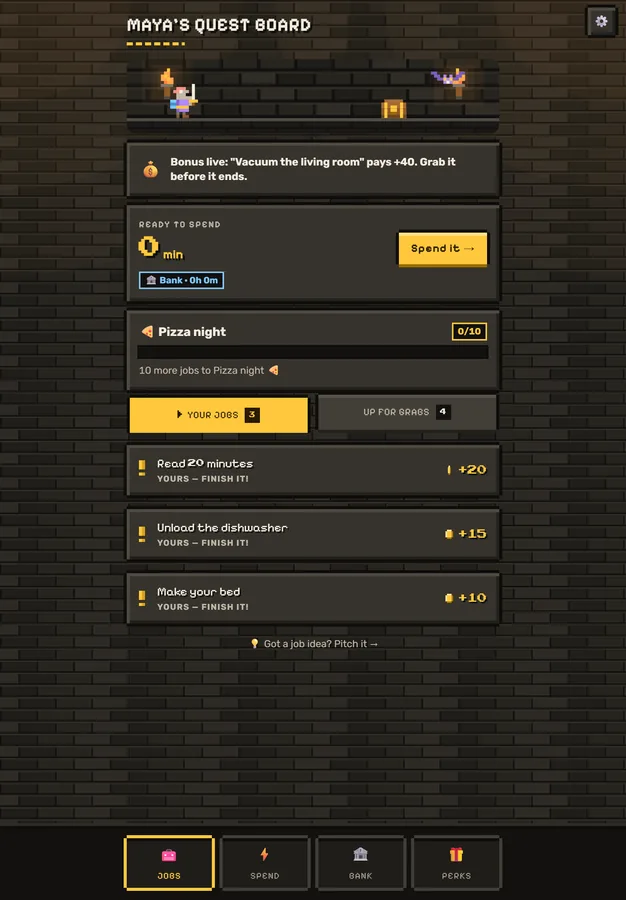
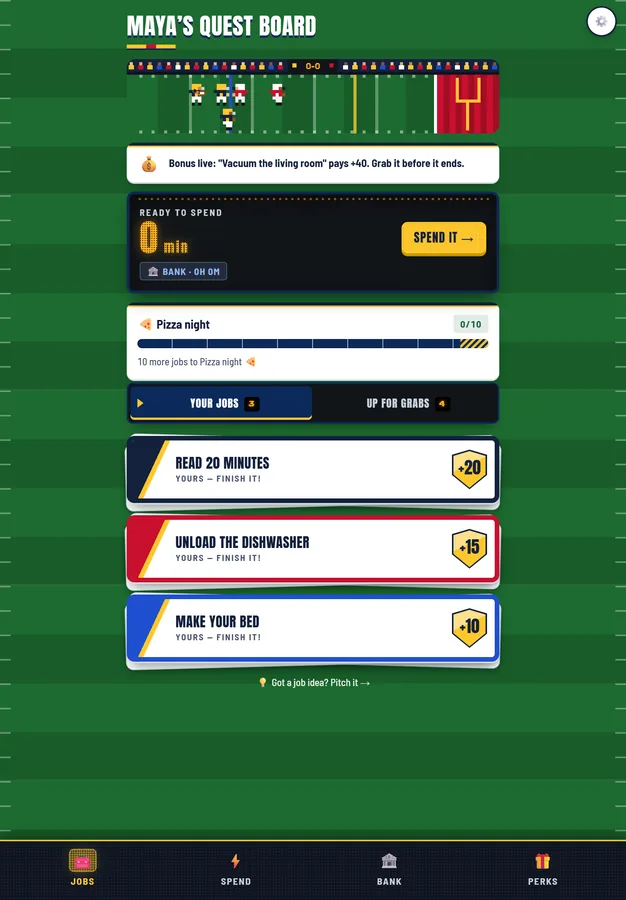
    Modern, Western, Dungeon or All-Star, each with its own animated scene.

  • Finish the day, spin the wheel

    Clear every daily job to earn a prize‑wheel spin.

  • Pitch a job, name a price

    You say yes, change it, or pass.

  • Save up for something

    A bank that grows and family goals everyone chips in on.

  • Maya’s quest board on her tablet, in the Modern look.

    Modern

  • Maya’s quest board on her tablet, in the Western look.

    Western

  • Maya’s quest board on her tablet, in the Dungeon look.

    Dungeon

  • Maya’s quest board on her tablet, in the All-Star look.

    All-Star

Their win: a fair deal they can see. Your win: the help you asked for, without asking.

Straight answers

What it does. What it doesn’t.

A deal, not a lock.

CheckMyChores never takes control of a TV, console or tablet. Minutes are earned and visible, and asking takes one tap, so there’s little reason to sneak. Want a hard stop too? Keep Xbox Family Settings or iPad Screen Time on: CheckMyChores works alongside them.

  • Xbox

    Add the time in Xbox Family Settings. Save your Xbox Family Settings link once, and the Unlock screen gives you a button that opens it. Time buttons can match Xbox’s +15 / +30 / +1 hr.

  • TV, PlayStation, anything else

    You switch it on. The app keeps the clock, which starts when your kid asks, and tells you when time’s up (within a few minutes).

  • Tablets

    The same, or let a trusted tablet approve itself inside the hours you set.

The photo checker can be wrong.

A computer helper (Claude, made by Anthropic) compares each photo with the checklist. A clear pass pays right away, and no parent sees that photo first. Unsure ones get one retake and then come to you. Each week HQ shows you a few photos it passed on its own, so you can spot-check it. If one shouldn’t have paid, there’s no undo button yet: email us and we’ll fix the balance.

What we collect about your kids.

Their first name, a PIN (we keep a scrambled version, not the number), their chore photos and when each was taken, and what they type: questions for the Coach (a computer helper, not a person) and job ideas they pitch. The app also records what they do in it (jobs, minutes, strikes and screen time), the AI’s notes on each photo and a fingerprint of it (both outlast the photo), the kind of device they use, and IP addresses in server logs.

What happens to a chore photo

  1. Taken on your kid’s device.

  2. Hidden location data removed on our server (the picture itself is untouched).

  3. Checked by Anthropic’s AI.

  4. Our copy is deleted 30 days after the job is done (backups catch up within 90 days). Anthropic’s copy follows its own retention: see the privacy notice.

FAQ

Fair questions.

Something else? hello@checkmychores.com

Does it lock the TV or Xbox for me?

No. It never takes control of a device. You switch the screen on (on Xbox, add the time in Xbox Family Settings) and tap Unlocked. Their minutes count from when they asked, so a quick yes gives them the full time. The app keeps count and tells you when time’s up, within a few minutes.

Then what stops them from just turning it on?

Honestly, nothing in the app physically stops them. What changes is the deal: minutes are earned and visible, and asking takes one tap. Use your devices’ own parental controls for hard limits. On an iPad, Screen Time can lock everything else while CheckMyChores stays open. If it limits websites, add app.checkmychores.com to the allowed list.

Do I need to buy anything?

No. It runs in the browser on the phones and tablets you already have.

Does my kid need their own phone?

They need a phone or tablet to sign in on, and an old one works. Don’t set it up on your own phone: a clever kid could approve their own screen time.

How do kids sign in?

You set up their device once with a 6-character code or QR from Settings → Kids’ phones & tablets. Then they sign in with their own 4-digit PIN. During the beta, we set up the PINs with you.

Who checks the photos?

A computer helper, Claude by Anthropic, compares each photo with the job’s checklist, giving borderline work the benefit of the doubt. A pass pays right away. If it can’t tell from the photo (too dark, blurry, the job cut off), your kid gets one retake, then it comes to you. It can be wrong: you can approve or redo anything that comes to you, and refund a cheating penalty. A pass it paid on its own has no undo button yet, so email us and we’ll fix the balance.

What if my kid fakes a photo?

A photo whose date shows it’s more than 30 minutes old gets turned away. Some photos carry no date (a picture saved from a chat, say); those can’t be dated, so they still go through the AI check. The exact same photo sent again for another job or day is caught, and the AI is told to flag a picture of a screen or a printout, though it can miss one. A reused or flagged photo is a warning the first time. After that it costs minutes: 30 unless you change it. If the app got it wrong, you can refund the penalty.

What does it cost?

Free during the beta. No card. If that ever changes, you’ll hear first and decide then.

Is there an app to download?

No app store. Open it in Safari or Chrome and add it to your home screen. On iPhone, notifications work after it’s on the Home Screen.

Why invite-only, and who can join?

A few families at a time, so every family gets a real person. The beta runs on US Central time for now; somewhere else, ask anyway.

Invite-only beta

Get your evenings back.

CheckMyChores started as one family’s fix for the nightly screen-time argument. We’re letting families in a few at a time.

  1. A real person reads every request and writes back by email.
  2. We set up your kids, their PINs and your screens with you.
  3. You answer five quick questions and your first chore board builds itself.

Kid reading this? Good find. Go get a grown‑up. This part is for them.

Only used for your invite and to reply to you.

How many kids?
Which screens are the fight? (optional)

We’ll also note your time zone (the beta runs on Central time) and, to stop spam, your IP address and browser for 24 hours. We use this only to decide on invites and write to you about them; see the privacy notice.